
QG Magify
08/09/2026
Créer ou modifier une fiche produit Shopify : guide complet
Deleting a Shopify store is not a step to be taken lightly. I say deactivate and not delete because you cannot permanently delete your Shopify online store (at least, not right away). Shopify will keep it on their servers for 2 years in case you change your mind. A little information: for obvious security reasons, the Shopify team cannot do it for you, but they can help you if you have any questions.
But I'm here to guide you 😉! You'll see, it's not very difficult to do.
*Puts on e-commerce coach hat* I just want to make sure you're sure of your choice. There's a solution to every problem. Of course, if you just wanted to test the Shopify platform, are 100% convinced of your choice, or find the fees too high for your budget, there's not much more I can tell you. You can go directly to the next section.
If you're not making enough sales to generate a comfortable income, I can probably help you. The first question to ask yourself is whether you've really put your all into your online business. I ask this question because it's often what comes up with some clients: regretting having given up so quickly.
Let's analyze this together! There are 3 main reasons why you fail in e-commerce.
The offer and targeting: "Is your offer relevant to your ideal target?", "Does your offer solve a sufficiently painful and urgent problem for your target?", "Are your products of good quality?". If you hesitated to answer yes, I advise you to conduct online surveys and/or interviews to better understand your potential customers. This is not an easy exercise but it is necessary.
Communication: "Are you communicating on the right channel(s)?", "Do you create content regularly and, above all, do you analyze your results?", "Are you using words that will reach your target and make them buy your products?".
The online store: "Does your site inspire confidence?", "Do you offer several payment methods?", "Is it clear what you're selling?", "Are your photos of good quality?". Here, it will be more of a conversion problem.
Sometimes, small adjustments here and there (methodically) can unblock the situation and allow you to sell much more. If you'd like to be supported, I invite you to discover the GAME PLACE challenge. The 6-week method to learn how to regularly sell your digital and physical products.
Back to the main topic: deleting or temporarily deactivating the Shopify account.
Closing your store means you will no longer need to pay for your plan (and paid apps), but you will no longer be able to access your dashboard or make sales, of course. As mentioned earlier, Shopify will keep your store on their servers for 2 years in case you change your mind. After 2 years, you will not be able to create a new store with the same name or .myshopify URL.
If you then change your mind, you will have to select and pay for a Shopify plan directly. You will not be able to benefit from the usual 3-day trial period or the exclusive offer of €1 per month for 3 months.
🧐 Subscriber question: "What if I cancel my account before the 3-day trial period, will I be charged?" - No, you will not be charged if you do so before these 3 days.
⚠️ Very important: your store cannot be closed if you have unpaid invoices. Any remaining balance you may have on your account (transaction fees, amount billed for shipping labels, or app subscriptions) will be billed upon cancellation. If you have no invoices to pay on your account, you will not receive any final invoice.
Temporarily deactivating your Shopify account is an interesting alternative if you need to pause your store for various reasons without paying full price (€10 instead of €36/month for the Basic plan, for example). However, you cannot temporarily deactivate a store during the trial period or during the exclusive offer of €1 per month for 3 months. Your store will still be online, but your customers will no longer be able to pay.
What do you prefer? 🤔
I've created a checklist that summarizes what you need to pay attention to when deleting or deactivating a Shopify account. I strongly advise you to read the rest carefully.
You can also watch the YouTube video if you prefer video tutorials 👇.
If you close the store, you will no longer be able to access your dashboard unless you pay for a Shopify plan again, so you need to pay attention to several things.
✅ You must:
If you deactivate your store, customers will no longer be able to pay, but the site will still be online. Depending on your situation, you can also password-protect your store while waiting to reactivate it.
✅ You must:
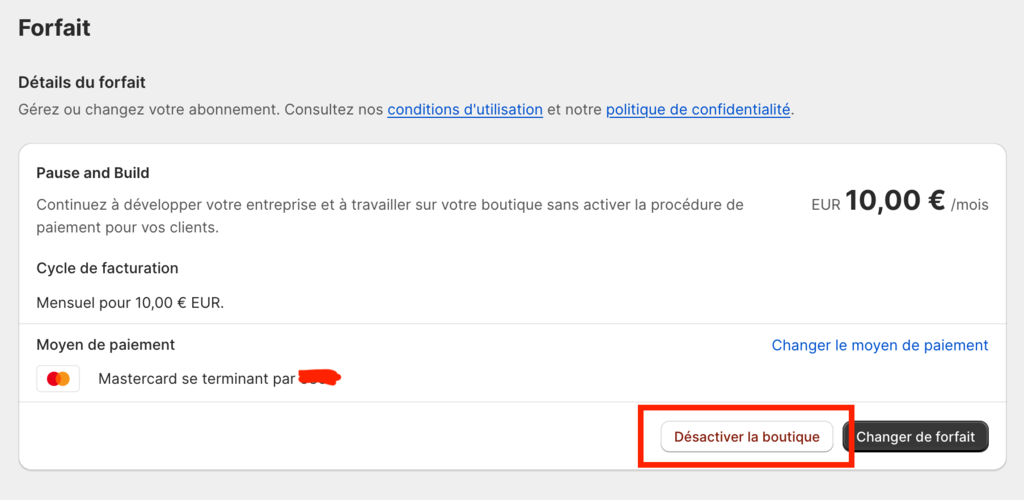
Log in with the owner account, then go to Settings > Plan.
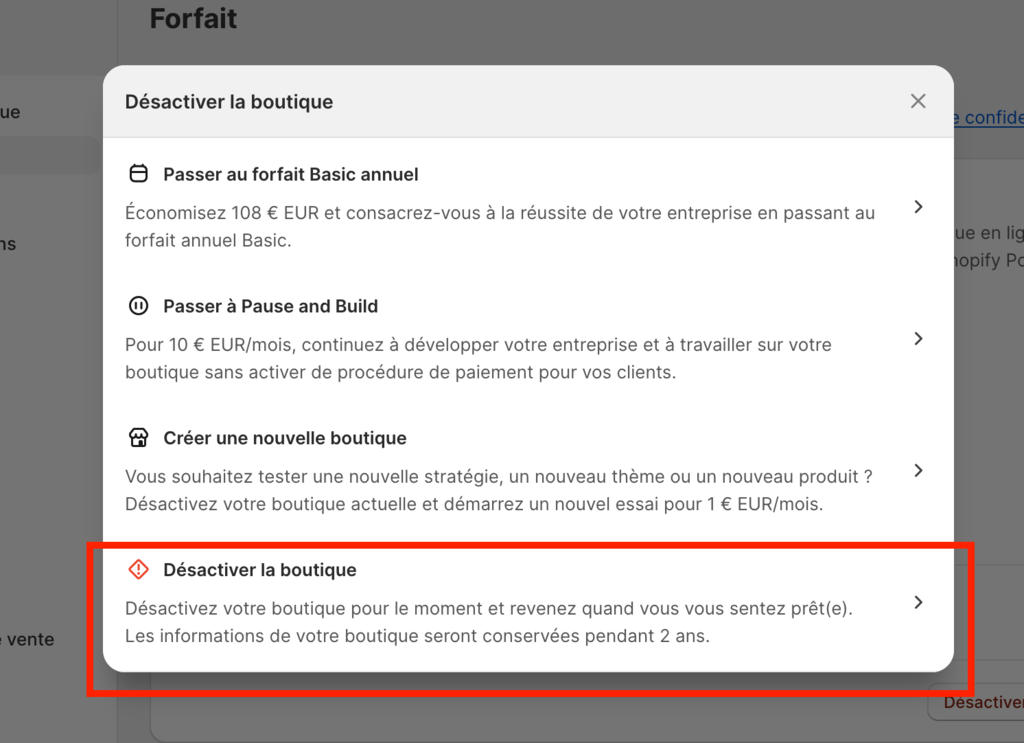
Then, select "Deactivate store". You will be asked why you want to delete the online store; you can enter whatever you want, it's not important.
Shopify warns you: “After deactivating your store, you will no longer have access to the Shopify admin interface, including your sales data, reports, or product and customer information. We will retain this information so you can easily restart your store if needed.”
You can click "Keep my payment information for easier store reopening" if you wish.
The last step is to enter your password and then click "Deactivate store."
Log in with the owner account, then go to Settings > Plan.
Then, select "Switch to Pause and Build." Then click on "Change plan now."
Shopify warns you: "If there is time left on your current plan, it will be prorated and credited to your account."
And that's it for the tutorial. Feel free to comment if it helped you or ask a question if needed.
Des pépites t’attendent juste en dessous
Une sélection de guides stratégiques sur Shopify, pensés pour t’aider à structurer ta boutique, augmenter tes ventes et développer ton business sans dépendre de la publicité. Voir le blog.